How Virtual Reality is Changing Education

We all know how wildly popular Pokémon GO was when it first launched (and continues to be). With as many as $5.7 million spent daily on in-app purchase and 21 million active users, it’d be an understatement to say it is an overwhelming success. Augmented and virtual reality (VR) are the technologies behind Pokémon GO. It’s estimated that over the next several years the growth in VR will surpass that of smartphones. Up until now, virtual reality has been largely used for entertainment purposes. However, the applications extend to other facets, including that of education.

Virtual Reality in Educational Settings

VR allows for high-impact learning experiences and as this new age of affordable VR tech presents itself, the opportunities for improving education abound. Educators are well aware of the positive impact out of classroom experiences have on learning. From K-12 classrooms, to college internships, to undergrad research and studying abroad, high-impact experiences provide increased learning and retention. Unfortunately, these types of programs have traditionally involved a good deal of time, money and personnel. With both the availability and affordability of VR, students nationwide will have access to high-impact educational experiences.

From taking a guided tour of the Great Wall of China, to examining world-renowned art in a museum halfway around the globe, these micro experiences are able to shape student learning far more than an in-class lecture. Imagine biology students exploring the Great Barrier Reef firsthand or students in a history class having that ability to observe an ancient Mongolian tribe. Beyond travel, VR also supports training experiences via virtual labs in chemistry, biology and engineering. These sort of high-impact micro experiences will become standard practice with VR. Not every student can travel abroad, yet anyone is able to venture to the library, put on a VR headset and begin virtual exploration. By using VR, student experiences transform critical thinking.

Best Practices for Virtual Reality

As the potential for an educational revolution begins, it will be necessary for research to be completed in order to determine best practices and the most meaningful applications of VR for education. Students will need to learn the technical side of VR and how to navigate the relationship of virtual and real life. With the users being thrust into the subject matter, research and exploration into multi-sensory learning will be key. Educators need to know how the immersive learning environments are impacting students – for good or bad – and be able to adjust how the technology is used based on those answers.

In an effort to harness the potential of VR, institutions will need to think beyond the initial “wow” factor for students and determine how to capitalize on building knowledge.  Standards will also need to be determined in managing how students navigate between the physical and virtual world in relationship to coursework and communication via instructors and fellow students. The applications of VR outside education will progress and inevitably bring up additional considerations for instruction and learning. Like all technology, as it evolves so will the need for regulation and best practices by the educators who implement it.

VR presents a bounteous and untapped future for education. Learning will morph into something that becomes a full sensory experience available to all students, regardless of background. Students who may not have the means to travel the world may be able to get an up-close look at it anyway with virtual reality technology. Everything that is taught will be interwoven and embedded into their world. Real and virtual realities will melt together to offer high-impact experiences that immerse students in a way that no other educational resource previously has.

The Brains of K-12 Students Come Prewired for EdTech

Forget the books. Save your paper and pencils for Art Projects.

Generation Z students, born in the late 1990s to the present, have grown up with Laptops, iPads, and smartphones. Their brains have evolved to process more information at faster speeds than previous generations of learners. Getting and keeping their attention presents a challenge, yet we tend to ignore what triggers their motivation. We talk at them and hand them a thick textbook full of words.

What differentiates the human brain is its neocortex, the frontal lobe which can absorb and store more bits of information than the brains of any other species. An effective teacher will motivate their students to absorb what is taught into their cortex.

The technology used in education (EdTech) provides a powerful means by which to do this. When used appropriately, EdTech engages Gen Z students because it feeds directly into what their brains enjoy doing — learning.

Recently, there has been lots of interest in brain-based instruction. Supported by current research, neuroscience emphasizes how the human brain learns naturally and how it functions at varying developmental stages. For example, a beginning reader learns by connecting letters and letter strings to sounds. Graphogame is a technology-based game that attempts to address this basic first step in learning to read. It combines neuroscience with education. In Graphogame, a child’s efforts are analyzed by online algorithms and lessons are modified to match the learner’s ability. Studies have shown that practice with the type of game can initiate print-sensitive activation in regions that later become critical for mature reading.

There are other such neuroscience-based EdTech applications. One of these is Earobics, a computer-assisted training program which aims to improve reading skills by improving children’s sound perception, memory, and phonological awareness. Another, still in development by Lifestyle Learning, is called “Career Readiness Application.” This interactive program engages the neocortex by taking advantage of the fascination Generation Z has with playing online with avatars and tying motivation and course selection to career aspiration.

Another characteristic of human beings is that we are a social species. It has been shown that social learning experiences, as well as independent ones, can be informed by neuroscience. A study by Judy Willis in 2011 found that students who worked on a project in groups experienced a surge in dopamine, the chemical that is released during pleasurable situations and stimulates students to remember information better. So how can we combine what neuroscience tells us about collaboration among Gen Z students with learning through technology?

Jon S., an elementary teacher in California, did it this way. He provided a virtual workbench and blog format that enabled his students to create online portfolios.  As Jon describes it, “The kids anonymously publish their writing and art and share it online with an authentic audience. … As soon as the student publishes a new article, I get an instant email on my mobile device, enabling me to review and moderate the work. The parents can also get this instant email. Other readers (including other students in my class) comment too, but they won’t show up on the blog or be seen by the author until the comment has been deemed appropriate.” You can contact Jon for more detail.

ePals is commercial program for online communities of writers, that promotes teamwork and student collaboration and provides a collaborative writing space for kids to use during class. These products operate like Jon’s creation but do so on a global level. Students from around the world can send each other email (via a secure system that teachers can monitor), and where they can work together on projects that engage them in real-time video chats.

Such interactions involve Generation Z students partly because the part of the brain that is responsible for visual ability is more developed in generation Z than in other generations. Their brains of are physically different from earlier generations. Some researchers contend that because of these differences, the preferred use of technology for communication can be an indicator of a particular generation’s identity. For instance, baby boomers prefer communicating face-to-face. Generation X folks are fine with talking on the phone or using email. Millennials hang out in social media networks.

Generation Z would rather communicate in ways that don’t leave a paper trail. They prefer apps where communications are sent, and then users move on to the next stream of conversation. As a result, most Generation Z students prefer visual learning over kinesthetic or auditory.

Bottom line: rather than fighting the prewired preferences of Gen Z students, teachers can incorporate the findings of neuroscience into EdTech decisions and provide students with technology that sets their dopamine flowing and kicks up their motivation to learn.

Oh, and as for forgetting books, paper, and pencils – of course not. They are earlier EdTech implements, and the Gen Z brain can still appropriately and creatively use them.


An education for the 21st century means teaching coding in schools

**The Edvocate is pleased to publish guest posts as way to fuel important conversations surrounding P-20 education in America. The opinions contained within guest posts are those of the authors and do not necessarily reflect the official opinion of The Edvocate or Dr. Matthew Lynch.**

Leon Sterling, Swinburne University of Technology

Bill Shorten’s recent announcement that, if elected, a Labor Government would “ensure that computer coding is taught in every primary and secondary school in Australia” has brought attention to an increasing world trend.

Estonia introduced coding in primary schools in 2012 and the UK followed suit last year. US-led initiatives such as Code.org and the “Hour of Code”, supported by organisations such as Google and Microsoft, advocate that every school student should have the opportunity to learn computer coding.

There is merit in school students learning coding. We live in a digital world where computer programs underlie everything from business, marketing, aviation, science and medicine, to name several disciplines. During a recent presentation at a radio station, one of our hosts said that IT would have been better background for his career in radio than journalism.

There is also a strong case to be made that Australia’s future prosperity will depend on delivering advanced services and digital technology, and that programming will be essential to this end. Computer programs and software are known to be a strong driver of productivity improvements in many fields.

Being introduced to coding gives students an appreciation of what can be built with technology. We are surrounded by devices controlled by computers. Understanding how they work, and imagining new devices and services, are enhanced by understanding coding.

Of course, not everyone taught coding will become a coder or have a career in information technology. Art is taught in schools with no expectation that the students should become artists.

Drag and drop

A computer program is effectively a means of automating processes. Programs systematically and reliably follow processes and can be used to exhaustively try all the possibilities.

The languages used to program computers have evolved in the 70 years we have been building computers. Interfaces and programming environments have become more natural and intuitive. Language features reflect the applications they’re used for.

What is needed to easily express a business process, scientific equation, or data analysis technique is not necessarily the same as what is needed to rapidly develop a video game.

However, throughout the evolution of programming languages, the fundamental principles have remained the same. Computer programming languages express three essential things:

  1. The order in which a sequence of instructions is performed
  2. A means of repeating a sequence of instructions a prescribed number of times
  3. And tests as to whether or not a sequence of instructions is performed.

While personal preference influences which computer language a programmer uses, there is a greater understanding of which languages work well for teaching introductory programming. For example, Scratch is popular for primary school students and is quick to learn. Alice has been used to help students quickly build computer animations. Python is increasingly used for scientific applications. Visual programming languages – where students can drag-and-drop icons rather than type code – allow for rapid development of simple programs.

At Swinburne University of Technology we run workshops to introduce school students to program NAO robots. Students use the Choregraphe environment to link robot actions from a library.

Students previously unused to programming can develop interesting robot projects in a couple of days. More sophisticated development of the robot requires students to use a more detail-oriented language, such as Python or C++. The simpler options lead to positive student experience.

The Nao robot can be programmed easily to perform a range of tasks.
Brett Davis/Flickr, CC BY-NC

Computational thinking

Writing and then executing a program gives immediate feedback as to whether you have correctly expressed instructions for the computer. Ultimately, the understanding of how to express concepts so that a computer can perform tasks accurately and efficiently is far more important than the details of the programming language.

Underlying all computer programs are algorithms, which specify in a more abstract way how a task is to be done. Algorithmic thinking – also called computational thinking – underlies computer science, and there has been a growing movement on algorithmic thinking in schools.

The new national curriculum reflects algorithmic processes, and materials are being developed to help teachers with the new curriculum. Victoria has recently developed a new subject for the Victorian Certificate of Education (VCE) entitled Algorithmics.
There are even materials for teaching algorithmic thinking without computers. The Computer Science Unplugged movement, led by Tim Bell and colleagues at the University of Canterbury, has developed resources that teach students concepts through movement and fun activities.

Teaching for the this century

Teaching computer coding in schools is very different from initiatives that advocate for computers in the classroom. I was not, and am still not, supportive of compulsory laptop programs in schools.

The idea is not necessarily to expose students to the technology itself, which is almost inevitable these days with the wide penetration of mobile phones. Rather, students are exposed to the skills needed to develop computer applications.

While IT skill shortages is a contentious topic, there is no doubt that not enough of the best and brightest are studying computer science at university. A significant factor is insufficient exposure to the topic at schools. Teaching coding at schools is aimed at addressing the lack.

It might be said that whatever programming language is taught will be obsolete by the time the students enter the workforce. My experience is that, if taught properly, students can rapidly transfer the principles of one language to another.

In the 19th and 20th centuries, the challenge was to understand the physical world, and harness force and energy. This understanding percolated into the school curriculum. In the 21st century, the challenge is to understand and harness data, information and knowledge. Computer programming is a necessary way of introducing students to these concepts.


The ConversationLeon Sterling is Pro Vice Chancellor Digital Frontiers at Swinburne University of Technology.

This article was originally published on The Conversation.

Read the original article.

Cloud Computing and K-12 Classrooms

Cloud computing has taken the business world by storm. Climate controlled rooms full of servers are quickly being replaced by remote storage technology, whimsically referred to as “the cloud.” Over half of U.S. businesses use some form of cloud computing to back up their important data and improve productivity. Instead of trying to find the capital to pay for a secure server structure, businesses are subscribing to cloud services and paying for more storage as their needs grow.

The practical uses of cloud computing technology also translate to K-12 classrooms. Simply put, cloud storage saves space, money and time for teachers, parents, students and administrators. A report by CDW Government found that over 40 percent of schools use cloud applications to store their data and by 2016, schools are expected to spend 35 percent of IT budgets on the cloud. The savings add up though. Right now K-12 schools report that their cloud initiatives are saving them an average of 20 percent on IT costs. By 2016, those savings are expected to reach 27 percent.

So how exactly are K-12 schools using cloud computing and what are the benefits? Let’s take a look:

Stronger communication through access. Through K-12 cloud platforms like Edline, teachers have better communication with parents and students regarding assignments, tests and projects. Parents can log in from anywhere (including their phones or tablets) and instantly know how their kids are progressing. Teachers can post important messages and keep an archive of completed work in one spot. Depending on the school, cloud forums may even allow parents and students to contribute in the application for a two-way dialogue.

Disaster planning. Schools collect a lot of information on their students and that data impacts decisions and the well-being of the kids. It takes a lot of time to build student databases and maintain them. If a man-made or natural disaster threatened the physical location of school records, whether hard copies or stored on servers, it could mean a catastrophe when it comes to student information. Using cloud computing ensures that student records are secure and accessible, no matter what happens to the physical school building.

One-stop shopping. Cloud platforms are able to bring together data pools that were previously unconnected so that educators and administrators have everything they need in one spot. Since there is no physical equipment that schools must purchase to get started with cloud computing, there is also a pay-as-you-go mentality. Schools do not need to pay upfront for infrastructure and can add cloud storage as their needs increase. It saves money, space, time and other resources.

Fast recovery of data. If you’ve ever experienced a server crash on a personal or professional level, it can be a long time while you wait for your information to come back. Cloud-based businesses recover data quickly and often handle any technical issues that might arise in a “crash” situation. A word that is often associated with all cloud applications is “redundancy” because the technology eliminates any chance of single-point failure.

Some peripheral benefits of cloud computing are decreased energy costs and high security features to ensure protection and privacy of student information. As K-12 schools move toward cloud computing, student information will be better preserved and shared content more accessible. While use of the cloud does not have a large direct impact on classroom activities it does improve teaching efficiency overall. It also has long-term savings attached which is always a bonus when it comes to K-12 technology spending.

Does your school use the cloud yet? If so, how has it improved your school efficiency?


3 Ways Mobile Technology Boosts Instruction

The conversation about the benefits of mobile technology is often centered on students. What do students get out of adopting mobile technology?

But shouldn’t there also be a discussion about educator preference? After all, an Education Market Research post shows that educator enjoyment of technology is a major contributing factor to its ever-growing use in the classroom.

The debate is always student-centric but for these students to excel, teachers need to thrive too. This means administrative plans beyond simply purchasing mobile devices, or implementing bring-your-device policies that include teacher empowerment of the technology.

Mobile technology has potential to change the student-teacher dynamic for the better but only if implemented correctly. Here are a few ways I think all teachers can benefit from smart mobile technology use:

  1. Higher engagement levels. At least at the outset, use of mobile technology in K-12 classrooms will mean more students are interested in the class material. It remains to be seen what will happen once the novelty effect wears off, but perhaps by then mobile learning will be even more advanced than it is today, capturing students’ attention in new ways. Part of the interest in mobile learning from students’ perspectives is the flashy, fun element but the bigger attraction is empowerment. Lessons leave the blackboard and take place at the desk, giving students more control over it. Higher engagement from K-12 students who use mobile technology is a direct result of a feeling of ownership on the part of the student, whether perceived or not.
  2. Convenient progress tracking. Mobile education applications keep electronic records of where students succeed and where they need more help. This provides a great service to teachers who lack the time and resources to create customized learning plans based on student work profiles (though there are certainly some teachers who do put in this time, painstakingly). When students learn through mobile technology, teachers benefit from the convenient reporting. There is no guesswork on what skills need sharpening, particularly in areas like math. If an entire class population is struggling with a skill, the technology reporting signals to the teacher that the topic needs to be revisited. On the flip side, excess time is not spent on topic areas that are already learned.
  3. Less paperwork. Mobile learning gives copy machines a break and amounts to less paperwork for teachers. Instead of students waiting for an in-class assignment to be graded and then redone, mobile applications allow immediate opportunities to try again. This is a practical perk of mobile learning but one that makes the teaching AND learning process less cumbersome. In addition to less loose papers, mobile technology limits the amount of textbooks and other hard class materials that need to be carried around and stored in classrooms.

Anything that makes educators’ jobs a little easier, without sacrificing student achievement, benefits K-12 learning as a whole. The discussion of mobile technology in classrooms as it relates to students is vital but the teaching aspect matters a lot too. Schools need to provide resources for teachers to feel comfortable teaching though in mobile technology formats. This needs to happen in order for educators to really notice the positive impact it makes on their jobs.

How do you think mobile technology positively change the teaching profession?


Teachers: How to Use Google Drive

By Catlin Tucker

For teachers who are just getting started with Google, Google Drive can be intimidating! In preparation for a Google training, I’ve put together a short explanation of Google Drive and its basic features. Although an increasing number of people have a Gmail account, I run into teachers all the time who are not sure what Google Drive is or how it works.

Google Drive is like a big virtual bucket! It’s where everything you create with Google apps–documents, forms, sheets, slides, drawing–are stored. And unlike a traditional word processing document, you never need to click “Save”…EVER.  Your work is automatically saved every 5 seconds (or so).

Google Drive comes with 15 GB of free storage, so you can save files, photos, and videos. You can access any file in your Google Drive from any device as long as you have internet access. This means you are no longer tethered to a piece of hardware. You can open, edit and share files from any device that can get online.

For those with unreliable internet access, you can also install Google Drive onto your devices and work offline. Then when you are back online, your devices will sync and store your work!

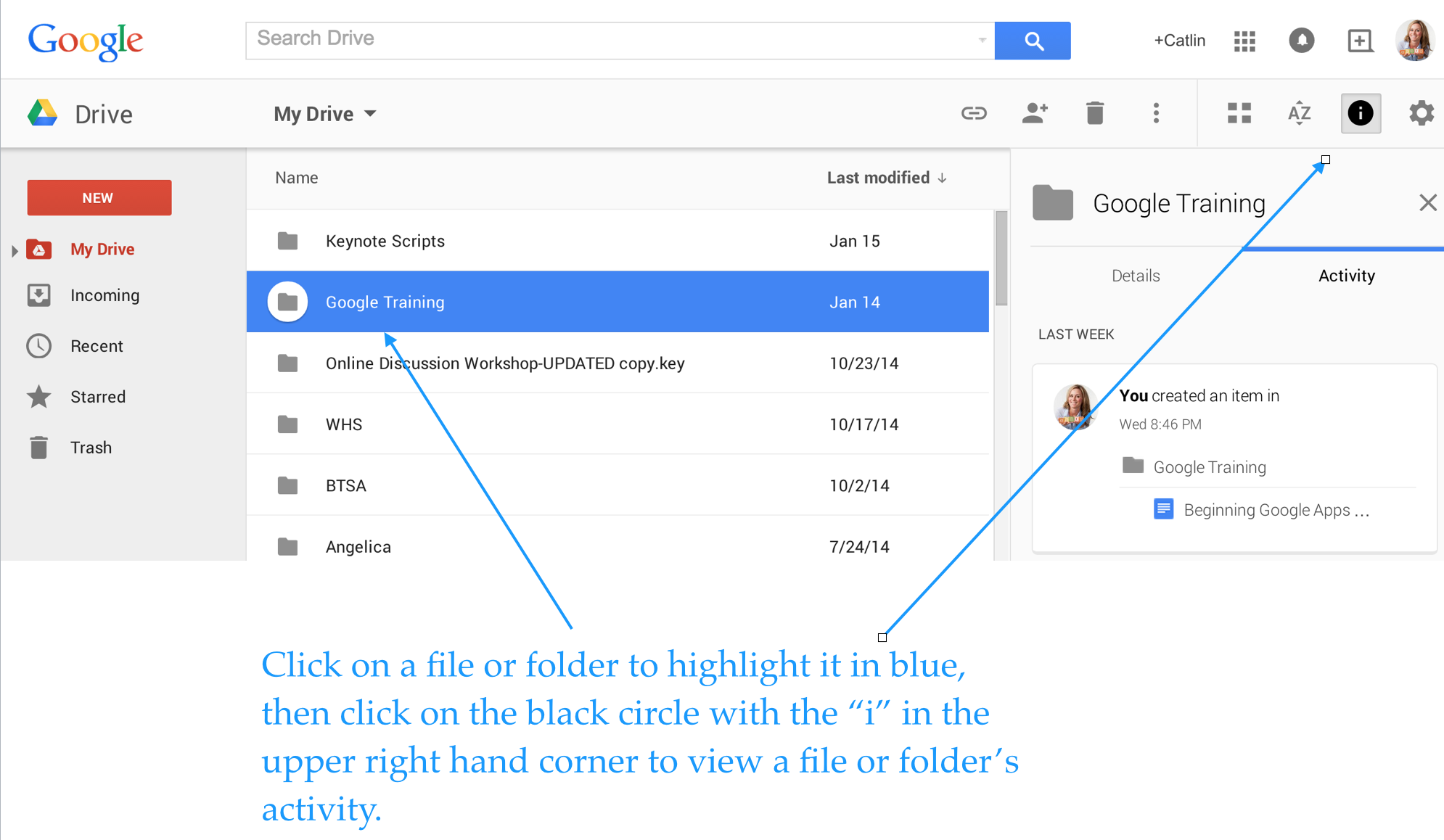
Here are some screenshots to help you navigate your Google Drive.

Organize your files in whatever order makes sense to you. You can limit your view to the files you’ve created, the files that have been shared with you or the files that have been most recently edited. This makes it easy to locate the files you’re looking for.

Screen Shot 2015-01-20 at 2.47.26 PM


Click on a file or folder and check out the “More actions” icon (3 vertical dots) to manage your documents more easily.

Screen Shot 2015-01-20 at 3.28.31 PM


Enjoy total transparency with the “View Details” icon (black circle with the letter “i” in the middle). Simply click on a file or folder and see all of the activity associated with it. You can see when documents were created, when they were edited, and who edited them!

Screen Shot 2015-01-20 at 4.06.24 PM


Last, but not least, you can insert files, photos and videos directly from Google Drive into your emails.

Screen Shot 2015-01-20 at 1.34.37 PM


If you use Google Drive and have tips to share, please post a comment!


This post originally appeared on Catlin Tucker: Blended Learning & Technology in the Classroom and was republished with permission. 


Digital Doom? 3 Effects of Texting and Tweeting on Students’ Writing Skills

Internet and cell phone cultures have brought a whole new meaning to American slang. Not only are kids these days speaking informally, but now those relaxed rules of grammar are sneaking into written words too.

This is probably not surprising at all, but do you know just how much this culture has affected our students’ writing skills? Fortunately, I have three research-backed results to show you.

1. Students can no longer tell the difference between formal and informal writing: The Pew Research Center’s Internet and American Life project asked middle and high school educators about their thoughts on digital tools and the impact on student writing. The biggest problem with these digital avenues of composition, according to surveyed teachers, is the blurring of lines between formal and informal writing. Abbreviations are common, particularly on platforms like Twitter that have a 140-character limit. Most smartphones now have no limits on texting characters, but students that owned phones with the 160-character limits of just a few years ago have already formed short, abbreviated habits. In the digital realm, short and sweet is the key – even if a grammar, punctuation and writing formalities fall by the wayside. The same is not true of educational writing pursuits though, as K-12 writing instructors must prepare students for the demands of strong, professional writing in college and the workplace.

2. But at least they are more creative: Over two-thirds of the respondents said that writing platforms provided through Internet and cell phone use have improved student creativity. Students also have more outlets for collaboration which encourages improvement and “putting it out there” in terms of writing that may have been closeted to notebooks or diaries in pre-Internet generations.

3. Even after graduating college, young adults cannot write. A report released by the Partnership for 21st Century Skills found that over 26 percent of college graduates have deficient writing skills. These findings were not based on graduation assessment exams, but compiled by interviewing actual employers. These employers said that many college-educated employees could not even accomplish the basic writing tasks of the job proficiently. How are these students earning college degrees if their writing is not up to par though? With the average U.S. student accruing $35,200 in college debt, it would seem learning the basics of writing, at least above a “deficient” level, would be a given takeaway.

The deficiency is not the fault of the colleges and universities though, at least not totally. Students are showing up for college without the skills needed to write well and with schools assuming they already know the basics. The 2011 book Academically Adrift found that less than half college students felt their writing had improved at all in college. Less than half also said they were never required to write a paper longer than 20 pages. In a nutshell, the writing proficiency that half of these students exhibited as seniors in high school was the same four years later, despite the so-called rigors and high cost associated with a college education.

While colleges could certainly take a hint from these numbers, the work of remedial writing education is not the responsibility of colleges. It falls on the teachers that come long before the adult years. These teachers face an uphill battle though, especially in an age where formal writing is often confused with everyday communication. The tools for creativity in the writing process may be better than ever, but the constraints of digital communication are hurting students’ composition and their attention spans too.

How can students who have essentially made a lifestyle of short, segmented, slang-ridden writing conform to the formal communication still expected in the real world? It starts with teachers who set high standards and do not waver. In the long run, the fear of losing a student’s interest by insisting on high writing standards is a small one compared to the implications of college graduates viewed as writing-deficient by the people who sign their paychecks.

How can K-12 teachers win out against the negative impact of digital communication on formal writing? Please share your thoughts.

10 Ways that Edtech is Transforming Education

Technology has greatly impacted the way we do things—from how we shop for basic necessities to how we conduct business with people around the world. It’s no wonder that technology has altered education, too. In fact, here are 10 ways that edtech has changed education.

Communication

Through email and text messages, teachers communicate with parents and students faster and easier. Teachers can send out homework reminders, progress reports, and assignments with the touch of a button. The increased level of communication helps parents stay informed about their children’s schooling and students stay informed on what assignments are due.

Differentiated Instruction

Teachers need to figure out how to serve students on multiple levels of understanding. Differentiated instruction is difficult and time-consuming. However, it’s necessary to challenge advanced students and aid struggling ones. Edtech assists with differentiated instruction through software programs and mobile applications. Many of these programs have multiple levels to help cater to each student’s needs.

Classroom Inclusion

Speaking of serving each student, teachers must meet the needs of students with IEPs. When students with learning disabilities spend time in a mainstream class, teachers need to figure out how to include them in the lesson. How can they do this? Through technology. For example, if it’s difficult for students to listen to lectures, they can watch a video or play a learning game that can teach them the information. If a student has a hard time writing on their own, they can use technology to record their notes. Technology opens up a wide range of options for accommodations that teachers can utilize in their lessons.

Interactive Lessons

One of the best ways to prevent classroom management issues is through creating engaging activities. Technology unlocks a wide range of interactive possibilities. Tablets, laptops, and computers in the classroom are just the beginning. Higher education institutions also use robotics, 3D printing, virtual reality, and wearable technology. As these and other advances become more readily available, elementary and secondary schools will have access to new technology that can make lessons more interactive and engaging for students.

Connectivity

Before the Internet and email, students wrote letters to pen pals from around the world. Then, they waited weeks or months to hear back from them. Now, students email their pen pals and connect with them on social media sites. Better yet, they talk to them face-to-face through programs like Skype and Google Chat. This can be a great way to open students’ eyes to other cultures and ideas.

Video Streaming

Videos make ideas come alive. It’s one thing to teach students about how a volcano erupts, but it’s better to show them a volcano erupting. With YouTube, TED Talks, and other online resources, there are thousands of videos available to share. These videos enhance lessons and deepen students’ understanding.

Collaboration

Through the Internet, teachers and students can connect more than ever before. Websites like Teachers Pay Teachers even allow teachers to share their ideas, lesson plans, worksheets, and more with one another. With the amount of resources available, it’s unnecessary for teachers to spend as much time creating new material to use in the classroom. Then, teachers can spend more time on continuing education opportunities, which are also available online.

Distance Learning

No longer do students need to ever set foot on campus to receive their education. Through technology, students can take classes anywhere with an Internet connection. This is true for elementary school students through college students. They can even attend an online high school with instructors or collaborate with classmates from around the world.

Resource Accessibility

Technology offers electronic books, mobile applications, and lots of other resources that schools can purchase at a lower cost. Schools have greater flexibility in the resources they choose, and they can easily update them throughout the years, as needed.

Student Motivation

Students are growing up with the need for instant gratification. They want immediate results, which technology can provide. As an added bonus, learning and mastering technology can also build students’ self-esteem.

Education technology is constantly evolving and we need to be able to evolve with it.